

Joes Lab Blog · 26 August 2026
kernelerror.com lived on a single Ubuntu VM running nginx and php-fpm, with MariaDB on a second box. WordPress 7.1 on PHP 8.4. It worked, in the sense that it served pages. Everything around it was manual: no scheduled database dump, no certificate renewal, no way to restart it that didn’t involve remembering which of two machines to log into.
Moving it into the cluster was the easy part. The cutover found four things I believed about the stack that were quietly, specifically wrong — and every one of them stayed invisible until real traffic arrived.
Moved from
One nginx VM, one MariaDB VM
Moved to
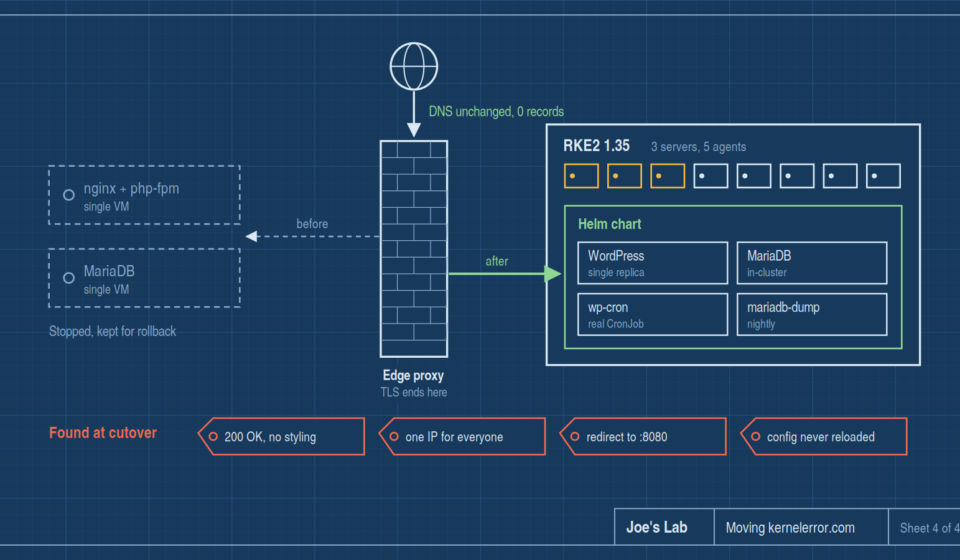
RKE2 1.35, 3 servers + 5 agents
DNS changes
None. Not one record
Bugs found at cutover
Four
before 10.1.7.99
What it was running on
The TLS certificate the old server presented had expired back in May, and had been expired long enough that the expiry date stopped being interesting. Nothing complained, because the only thing connecting to it was Caddy on the firewall, which had been told not to verify backend certificates. That detail matters later — it’s the reason the cutover had a safe rollback.
Meanwhile the cluster next to it was already running everything else, with backups and certificate issuance handled by things that don’t depend on me remembering.
chart helm
The shape of the destination
The target is an RKE2 cluster — Kubernetes 1.35, Cilium with kube-proxy fully replaced in eBPF, the bundled ingress-nginx, NFS-backed persistent volumes, and cert-manager issuing from an internal CA.
The site itself became a Helm chart: WordPress and an in-cluster MariaDB, wp-cron driven by a real CronJob instead of depending on visitor page loads, and a nightly mariadb-dump. Single replica on purpose — two WordPress pods sharing one wp-content race each other on .htaccess and plugin updates, and that is a worse problem than the one a second replica solves.
Both persistent volumes use a retain storage class. The database is obvious. The wp-content volume is the one people get wrong: it isn’t a cache of the image. It holds every upload, plugin and theme, plus the wp-config.php carrying the generated auth salts. Lose the salts and every user is logged out permanently; lose the volume and you lose the media library, which no database dump contains.
tar exit 2
The first thing that broke had nothing to do with WordPress
The pod wouldn’t start. It crash-looped on this:
tar: .: Cannot change mode to rwxrwxrwx: Operation not permitted
tar: Exiting with failure status due to previous errors
Which looks like a disk problem, or an image problem, and is neither.
The official WordPress image populates /var/www/html by unpacking a tarball. When it detects it’s running as a non-root user, it adds --no-overwrite-dir to protect the target directory’s existing metadata. That flag makes tar re-apply the directory’s mode after extracting — which is a chmod, and only the owner may chmod.
The NFS provisioner creates each volume’s directory owned by nobody, because the export uses root_squash. The container runs as uid 33. Uid 33 is not the owner, so the chmod is refused, tar exits non-zero, and the pod dies before Apache ever starts.
The trap
Running the container as root doesn’t fix it. root_squash maps root to nobody too, so root isn’t the owner either. The obvious escalation is the one thing guaranteed not to work.
The fix sidesteps it rather than fighting it: an init container copies the files in with cp -R, which writes into the directory without ever touching the directory’s own mode. Once the files are there, the image’s entrypoint sees index.php, skips its own copy entirely, and everything downstream behaves.
staging extraHosts
Staging the name before you need it
The part of this migration I’d repeat unchanged: the new hostname was added to the Ingress and its certificate days before any traffic went there.
The chart grew an extraHosts value, so one Ingress and one certificate carry several names. With the public name and the apex listed alongside the internal name, cert-manager reissued a certificate carrying all three as SANs, and the ingress started answering to all three — while the public site was still served entirely by the old box.
That means the cutover can’t fail on certificate issuance, a DNS propagation delay, or a typo in a hostname. Those all get discovered while nothing is at stake.
The other half of the safety net is that DNS never changed. Both names already pointed at the firewall — not at the web server — because the firewall is where TLS terminates. So “cutting over” means editing a proxy destination, and rolling back means editing it back. There’s no TTL to wait out.
plan 4 steps
The plan, and the order I got wrong
The runbook had four steps, written down in advance, with a note explaining why the order mattered:
- Trust the proxy’s forwarded headers — so visitors arrive as themselves rather than as the firewall.
- Swap the canonical hostname — make the public name the one WordPress builds its URLs from.
- Repoint the edge proxy at the cluster — send real traffic to the new backend.
- Stop the old web server — leave the VM intact as a rollback.
What actually happened is that step 3 went first.
The result was not an outage, which is exactly what made it dangerous. The site returned a clean 200 OK. It also returned a page with no styling whatsoever — because all 113 asset URLs on the home page still pointed at the internal hostname, which resolves only on the LAN. Every visitor got readable text and nothing else, and no error anywhere said so.
Why this is the one ordering that bites
A broken deploy that returns 500 pages announces itself. A deploy that returns 200 with unreachable assets looks healthy to every check that only reads a status code — including mine.
bug 01 200 ok
WordPress doesn’t redirect what I assumed it redirects
The reason moving the proxy first looked harmless was a belief written into my own chart comments: that WordPress issues a canonical redirect from any non-canonical hostname to the real one. If that were true, pointing traffic at the new name early would just bounce visitors to the old name — untidy, but harmless.
It isn’t true. A front-end request arriving on a non-canonical host is served 200, with no redirect at all. What the canonical setting actually controls is the URLs WordPress generates — so the page comes back built from whatever the canonical name currently is.
Only the admin and login paths genuinely redirect, because those build their URLs from the site URL directly:
# front-end on a non-canonical host
$ curl -sI https://<other-name>/
HTTP/2 200          ← served, not redirected

# admin on the same host
$ curl -sI https://<other-name>/wp-admin/
HTTP/2 302
location: https://www.kernelerror.com/wp-login.php?…
So a staged hostname is a working entry point, not a parking space. The ingress answering to a name and the application being ready for that name to be canonical are two different states, and I had collapsed them into one.
Rule I’d write down
Swap the canonical name before pointing traffic at it — never after. And verify behaviour with curl -I rather than from memory of how you think the software works.
bug 02 10.1.51.1
The entire internet arrived as one IP address
Public traffic reaches the cluster through Caddy on the firewall. Without configuration, the ingress controller overwrites the forwarded-for header with the connection’s own source address — so every visitor on earth reached WordPress as the firewall’s internal address.
On its own that’s a logging annoyance. What made it urgent is that this site runs Wordfence, configured to lock out an address after 20 failed logins for four hours. If every visitor is the same address, they all share one bucket. Twenty failed logins from anywhere in the world would have locked out login for everyone, for four hours, repeatedly.
The fix is two settings, and the second one is the important one:
use-forwarded-headers: "true"
proxy-real-ip-cidr:    "<edge-address>/32"
Trusting forwarded headers unconditionally is worse than ignoring them, because it lets any client forge its own rate-limit key. The CIDR is what makes it safe: it’s nginx’s set_real_ip_from, so the header is believed only when the connection genuinely comes from the edge proxy. Everything else keeps its real source address.
Worth verifying rather than assuming, so I forged one from a machine that isn’t the edge:
$ curl -H 'X-Forwarded-For: 203.0.113.99' https://<ingress>/

# what the application logged:
10.1.50.139  ← the real source. Forgery ignored.
bug 03 :8080
Apache writing redirects to a port the internet can’t reach
With the site otherwise healthy, the admin URL did this:
$ curl -sI https://www.kernelerror.com/wp-admin
HTTP/2 301
location: http://www.kernelerror.com:8080/wp-admin/
Wrong scheme and a port nothing publicly routes to. Adding the trailing slash by hand worked fine, which is the clue.
That redirect is Apache’s, not WordPress’s. It’s mod_dir adding a trailing slash to a directory request, and it fires before PHP is ever reached. No WordPress setting can correct it, because WordPress never sees the request. Apache built the URL from the connection it actually accepted: plain HTTP on port 8080, because the container listens on 8080 and TLS terminates upstream.
The fix is to tell Apache what it is publicly called. It took two attempts, and both failures were silent:
- Setting the canonical-name directive at global scope did not reach the virtual host.
- Giving the server name a scheme but no port still fell back to the physical port — Apache only uses an explicit port if you write one.
Both directives inside the virtual host, with scheme and port spelled out, is what finally worked:
<VirtualHost *:8080>
    ServerName https://www.kernelerror.com:443
    UseCanonicalName On
Port 443 is the default for HTTPS, so Apache omits it from the URL it emits. The chain is now clean end to end:
301 → https://www.kernelerror.com/wp-admin/
302 → https://www.kernelerror.com/wp-login.php?…
200
bug 04 subPath
The config change that reported success and did nothing
Fixing the Apache problem surfaced a worse one underneath it.
The Apache and PHP config files are mounted individually rather than as a whole directory — necessary, because mounting the directory would hide the eleven config files the image ships and WordPress wouldn’t run at all. But a single-file mount is never refreshed in a running container. The file the container sees is the one it saw at startup, forever.
There was nothing in the pod template tying it to the config. So a deploy that changed Apache’s configuration would update the stored config, report success in green, and leave the old file running. The change appears applied. It is not applied. Nothing anywhere says so.
The fix is a checksum of the config in the pod template, so any change to it rolls the pod. Which required splitting the config into its own file first — a template can’t hash itself:
# hashing the file that contains the hash:
Error: error calling include: … error calling include: …
       … recursion continues until the renderer gives up
This is the bug I’m most glad to have caught, because it wasn’t causing a visible symptom — it was quietly guaranteeing that every future config change would land only when something unrelated happened to restart the pod.
after 200 ok
What I’d carry forward
The migration itself — moving files and a database into a chart — was the least interesting part of this. Everything expensive lived in the gap between “the new thing is running” and “the new thing is the one being used.”
- Stage names early, promote them late. Getting certificates and routing sorted days ahead removed a whole category of cutover risk. Just don’t mistake a name the ingress answers to for a name the application is ready to be known by.
- Order the runbook by blast radius, and then actually follow it. Mine was correct. I departed from it, and the departure cost more than the migration.
- A 200 is not a passing test. The worst state this site was in returned 200 for every check I had. Look at what the page references, not just what the server answers.
- Distrust your own comments. The single most expensive thing here was a confident, wrong sentence I had written myself months earlier and never verified.
- Keep the old box. It costs nothing to leave a stopped VM around, and it’s the difference between a rollback and an incident.
The site now serves on its public name, with real client addresses reaching the application, correct redirects, certificates that renew without me, and a database that dumps nightly. The old server is still sitting there, switched off, for another week or so.
Then it goes.