

Evaluating Ghost on the homelab cluster, and the single question that ended it
Ghost came up as a possible alternative to the software running this blog, so it got a real evaluation: deployed properly onto the same RKE2 cluster, with the same storage, the same ingress, and the same internal CA. It took about an hour to stand up and roughly ten minutes to reject.
The rejection had nothing to do with any of the problems hit along the way. Every one of those was solved. It came down to one architectural constraint that no amount of configuration gets around — and it is worth knowing about before you invest a weekend in Ghost rather than after.
Starting from a template, not adopting one
The starting point was sredevopsorg/ghost-on-kubernetes, which supplies a genuinely good container image: Google Distroless, Node 22, unprivileged user, no shell in the image at all.
Its manifests were used as a reference rather than applied directly, which turned out to matter. Four of its defaults would have failed on this cluster, and only one of them would have failed in a way anyone would notice.
The same permission trap, twice
Regular readers will recognise this one. All persistent storage here is NFS, and the export uses root_squash — root inside a container is mapped to nobody on the server.
The template runs MySQL as UID 65532 and ships an init container that chown -Rs the volume to match. That chown cannot succeed here: it runs as root, gets squashed, and is refused. The template swallows the failure with || echo, so the init container reports success and MySQL then cannot write its own data directory.
The fix was to delete the init container entirely and run MySQL as UID 999 — the user the official image is actually built around. It needs no chown at all, because its entrypoint only ever creates files inside the mount and never touches the mount point’s own permissions. That distinction is subtle and it is the whole ballgame on NFS.
The same template also mounts the data directory at a subPath. Subpath directories are created by the kubelet as root, which root_squash turns into nobody at mode 0755 — unwritable again. The volume root is the only directory this storage class hands over world-writable, so that is where the data directory went.
One obvious failure, one patient one
A nodeAffinity rule requiring node-role.kubernetes.io/worker=true. No node in this cluster carries that label, so the database would have sat Pending forever. At least that one announces itself.
The patient one: a rolling update strategy with maxSurge: 3. Ghost runs its schema migrator on every boot. On a version upgrade that setting would start up to three pods migrating the same database at the same time, against one shared content directory. Ghost does not support clustering.
This would have worked flawlessly right up until the first upgrade, and then it would have been very bad indeed. Changed to Recreate, which trades a few seconds of downtime for the guarantee that exactly one process ever touches the schema.
It phoned home before I caught it
The first boot log contained this:
INFO Pinging Explore with Payload https://explore.ghost.org/api/updateGhost 6 posts your site URL, its UUID, the active theme and your post counts to Ghost’s servers on every boot, and daily after that.
Here is the part worth writing down: it is not covered by Ghost’s documented privacy configuration flags. Those cover the version check and the Gravatar lookup. The Explore ping is gated separately, on an explore:update_url key that Ghost’s own bundled production defaults populate. Set every documented privacy flag to false and it keeps running.
Blanking that key is what stops it:
"privacy": {
  "useUpdateCheck": false,
  "useGravatar": false,
  "useRpcPing": false
},
"explore": {
  "update_url": ""
}
The boot log then reads Explore URL not set.
For the record, it did fire once before it was found. It carried the site URL, a freshly generated UUID, the theme name, and a post count of two — Ghost’s own sample posts. No real content existed yet. None of this is malicious and all of it is documented behaviour. I simply prefer a private site on an internal VLAN to be actually private.
The Gravatar flag deserves its own mention. Left on, Ghost sends a hash of every staff member’s email address to a third party in order to fetch an avatar.
A certificate error wearing a disguise
Every boot logged two errors:
ERROR Could not get webhook secret for ActivityPub TypeError: fetch failed
ERROR No webhook secret found - cannot initialise
fetch failed, and nothing else. It reads like an unreachable third-party service, and it would have been easy to file under “some feature I don’t use.”
Running the request by hand from inside the container gave the real answer:
UNABLE_TO_VERIFY_LEAF_SIGNATUREGhost was calling its own public URL — and the distroless base image ships only public root certificates, so it did not trust the internal CA that signs every site on this cluster. Every self-directed HTTPS call Ghost made was failing. This one just happened to log about it.
The fix turned out to be free. cert-manager already writes the issuing CA into the same secret it uses for the TLS certificate, as ca.crt. Mounting that one key and pointing NODE_EXTRA_CA_CERTS at it fixes the entire class of problem, needs nothing copied in by hand, and survives a CA rotation. Projecting only ca.crt also means the pod cannot read the site’s private key, which lives in the same secret.
Afterwards the error became an honest 404: that endpoint is served by a separate component Ghost Pro runs and this deployment did not have. A missing optional feature is a far better thing to be looking at than a misleading TLS error.
The question that ended it
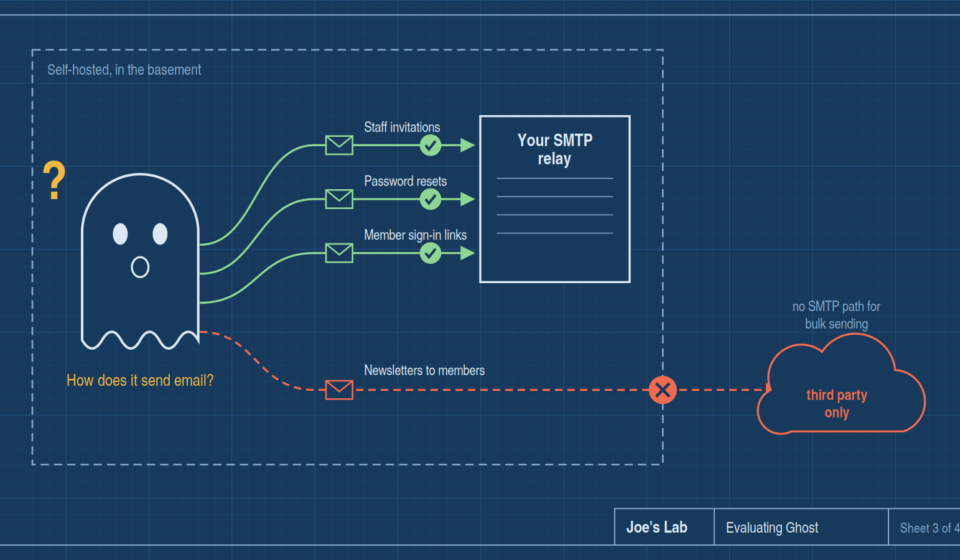
With everything working, one question remained: how does it send email to new members?
Ghost has two entirely separate mail paths, and the difference between them is the whole story.
Transactional email — staff invitations, password resets, and member signup and signin links — goes through nodemailer. Point it at any SMTP server you like. There is a mail configuration block and it works exactly as you would expect.
Newsletters to members are a different subsystem with a different configuration block, and checking every provider implementation in the image turns up exactly one:
email-service/mailgun-email-provider.js     <- the only one
lib/mailgun-client.js
email-analytics/fetch-mailgun-events.js
There is no SMTP provider for bulk sending. You can configure mail perfectly, watch signup links and password resets sail out through your own relay, and newsletters still will not send. Ghost requires a Mailgun account, and it is a deliberate long-standing decision on their part — the batch API and delivery event webhooks are what the analytics are built on.
So, for a self-hosted homelab:
- Staff invitations — your SMTP, fine.
- Password resets — your SMTP, fine.
- Member signup and signin links — your SMTP, fine.
- Newsletters to members — Mailgun only.
Handing a third party the mailing list, for a blog whose entire point is that it runs on hardware in my basement, is a non-starter. That ended the evaluation.
Worth being precise about what this is and is not. It is not a homelab problem you could engineer around, and it is not a configuration gap that better documentation would close. It is Ghost’s architecture. If self-hosted newsletters are a requirement, Ghost is ruled out no matter how you deploy it — which is exactly the kind of thing you want to discover in hour one rather than month six.
The trap sprung once more on the way out
Both volumes had been created with a Retain reclaim policy. That was deliberate: storageClassName is immutable on a volume claim, so starting with delete-on-removal and then deciding to keep Ghost would have meant recreating the volumes and migrating live content. Retain costs one manual cleanup if the answer is no. The other choice costs a migration if the answer is yes.
The answer was no, so the cleanup came due. Deleting the namespace and the released volumes was instant. Removing the leftover directories from the NFS share was not, because root_squash showed up one last time.
A cleanup pod running as root maps to nobody, and nobody cannot unlink files inside directories owned by UID 999 or UID 65532. The first pass cleared the world-writable top level and then stopped dead:
rm: can't remove '/share/pvc-.../themes/ease/author.hbs': Permission deniedThe second pass ran the deletions as those two UIDs, then removed the emptied parent directories as root — which works, because squashed root is nobody, and nobody owns them. The share went from twenty directories to eighteen. Every other application’s volume verified untouched.
The same NFS behaviour that shaped the deployment also shaped the teardown. Storage semantics are not a detail you deal with once at the start.
What I would keep
Ghost itself was good. It booted in about thirty seconds the first time, creating some ninety tables over NFS, and around seven seconds thereafter. It sat at roughly 180 MiB of memory with MySQL at 490 MiB. The admin interface is genuinely nicer than what I am typing this into. Nothing about the software was the problem.
Three things carried over regardless of the verdict:
- Read the first boot’s logs line by line before declaring anything finished. Both genuinely interesting problems here were sitting in plain text in that output, and neither one stopped the site from serving traffic. That is precisely why they were worth finding.
- An error message names a symptom, not a cause.
fetch failedmeant a certificate problem. A chown that “succeeded” meant a database that could not write. Neither said what was actually wrong. - Ask the boring integration question early. Not “does it install” but “how does it send email, and to whom.” An hour of deployment work was answered by ten minutes of reading one service directory. That reading should have come first.
So this blog stays where it is. The evaluation still counts as time well spent — a clear no, arrived at with reasons, beats an unexamined yes.