

A homelab in three layers: bare metal, virtual machines, and Kubernetes
The previous post was about four things that broke while getting WordPress running here. This one is about what “here” actually is — because “it’s a homelab Kubernetes cluster” hides considerably more than it explains.
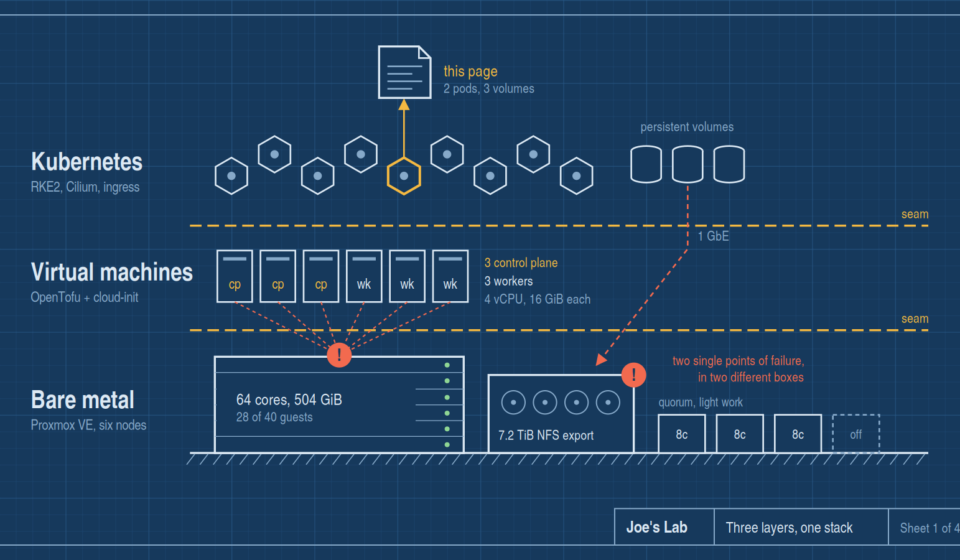
There are three layers under this page. Each one exists for a different reason, and each one has a failure mode the layer above it can’t see.
Layer one: the bare metal
The bottom of the stack is a six-node Proxmox VE cluster. It is deliberately not uniform — this is a lab that grew, not a rack that was purchased:
- One large compute host — 64 cores, 504 GiB of RAM. This is where almost everything actually runs: 28 of the cluster’s 40 guests.
- One storage host — 32 cores, 189 GiB of RAM, fronting a 7.2 TiB shared export that every other node mounts.
- Three small nodes — 8 cores each, 8–15 GiB of RAM. Useful for quorum and light workloads, not for anything hungry.
- A sixth node, currently offline.
Online capacity comes to roughly 120 cores and 731 GiB of RAM, running 33 virtual machines and 7 LXC containers. Backups land on three separate multi-terabyte pools, kept off the hosts that generate them.
The asymmetry is the interesting part. Most homelab write-ups show three identical machines, because that’s what the tutorials assume. Real labs don’t look like that. They look like one serious box, one storage box, and a few survivors from previous eras still earning their power draw.
That shape has a direct consequence: quorum and capacity live in different places. Six nodes vote, but one node carries the load. Proxmox is perfectly happy in that arrangement, and it will cheerfully tell you the cluster is healthy right up until the moment the one host that matters goes down.
Layer two: the virtual machines
The Kubernetes nodes are six VMs, and none of them were created by hand.
They’re defined in OpenTofu as a single map — three control plane nodes, three workers — and cloned from one Ubuntu 24.04 cloud-init template. Adding a seventh node is one map entry, not an afternoon.
Each node gets 4 vCPUs and 16 GiB of RAM. Control plane nodes get a 60 GB disk; workers get 100 GB, since they hold container images. Disks are qcow2 with discard enabled and iothread on, each on its own virtio-scsi controller so that setting actually does something. CPU type is passed through as host rather than emulated, which matters more than it sounds like it should.
Cloud-init handles addressing, DNS, the login user and its SSH key. Ansible takes over from there and installs the Kubernetes distribution itself.
A few things in that config are scar tissue rather than design, and they’re worth calling out because nothing about them is obvious:
- The QEMU guest agent channel has to be explicitly enabled on the VM, or the guest agent service fails at boot with a dependency error no matter how correctly the package is installed.
- The serial device has to be declared, because the template renders its console to serial — without it, console access for debugging is simply gone.
- Two fields are explicitly ignored for drift: the MAC address, assigned at clone time, and the cloud-init drive, which the hypervisor rewrites on every boot. Without those exclusions, the tooling reports phantom changes forever and you learn to ignore its output — which defeats the point of having it.
That last one is a small lesson with wide application. Infrastructure-as-code that cries wolf is worse than none, because you stop reading it.
Layer three: Kubernetes
On top of the VMs sits RKE2 — three servers running etcd and the control plane, three agents running workloads. Roughly 24 vCPUs and 93 GiB of schedulable capacity.
The pieces that make it a usable cluster rather than a pile of nodes:
- Cilium for networking, with kube-proxy fully replaced by eBPF. Service routing happens in the kernel rather than in iptables rules.
- A floating virtual IP for the API server, so
kubectlsurvives any single control plane node failing. Killing one migrates the address in about 15 seconds and etcd holds quorum. - ingress-nginx as the single HTTP entry point, with a small pool of addresses that Cilium announces on the local network for services that need their own IP.
- cert-manager with an internal certificate authority. There’s no inbound path from the public internet and no public DNS, so ACME is unusable. The certificates are real and properly chained — browsers just need the CA trusted once.
- A wildcard DNS record pointing at the ingress, which means a new site needs no DNS changes at all. This is a much bigger quality-of-life win than it sounds like.
Persistent storage is a single NFS-backed storage class provided by the storage host, with a second class that differs only in reclaim policy: Retain instead of Delete, for the handful of volumes nobody can rebuild. Databases and user-uploaded media use that one. Everything else uses the default, which keeps “which volumes actually matter” visible in the manifests instead of in somebody’s memory.
The part most homelab posts skip
Here’s what that architecture actually gets you, stated honestly.
Kubernetes-level high availability is real and tested. Kill a control plane node and the API stays up. That’s not theoretical; it’s been verified.
And all six VMs run on the same physical host. So if that machine goes down, the entire cluster goes with it — every control plane node, every worker, simultaneously. The redundancy is genuine at one layer and completely absent at the layer below it.
Storage depends on a different physical host. If the storage node fails, every persistent volume in the cluster becomes unavailable regardless of where pods are scheduled. Pods without volumes keep running. Databases stall.
So there are two independent single points of failure, in different boxes, and the cluster reports itself as healthy from inside either failure right up until it isn’t. That’s worth writing down precisely because a kubectl get nodes full of Ready invites you to forget it.
Could the VMs be spread across hosts? Partly — but the small nodes can’t carry a Kubernetes control plane comfortably, and the shared storage would still funnel through one machine. The honest summary is that this lab has real HA against software failure and none against hardware failure, and it’s built that way on purpose, with the trade-off understood rather than accidental.
The storage constraint that shapes everything
Every persistent volume crosses a 1 GbE link to the storage host. That single fact drives more design decisions than anything else in the stack:
- No Longhorn, no Ceph, no replicated block storage. The bandwidth isn’t there, and replication would multiply the traffic across the same wire.
- Databases work fine, but every fsync crosses the network. For a homelab’s write volume that’s genuinely fine — measured latency on the network path is actually better than one host’s local array — but it’s a ceiling worth knowing about before something write-heavy gets deployed.
- Anything using SQLite gets exactly one replica, because POSIX advisory locking over NFS is not something to bet data on.
Constraints like this are more useful documented than solved. The cluster isn’t going to grow a 10 GbE fabric this year, so the useful move is writing down what the limit implies and designing inside it.
What actually runs here
Beyond this blog: a chat server, a couple of production and staging web applications, a container registry runner, a management UI, and the usual supporting cast — spread over about a dozen namespaces and seventeen non-system workloads.
The blog you’re reading is one namespace among them: two pods, three volumes, an ingress, and two scheduled jobs. Three layers down, it’s a few files on a network share attached to a virtual machine on a single very large computer.
That’s the whole trick to a homelab, really. Every layer is simple. The complexity lives in the seams between them — and so do all the interesting failures.