

Putting WordPress on a homelab Kubernetes cluster
This blog runs on the thing it is about. It started as one sentence — “let’s create a manifest for a WordPress site” — and ended as 760 lines of YAML, two commits, and four failures that each pointed somewhere other than where the problem actually was.
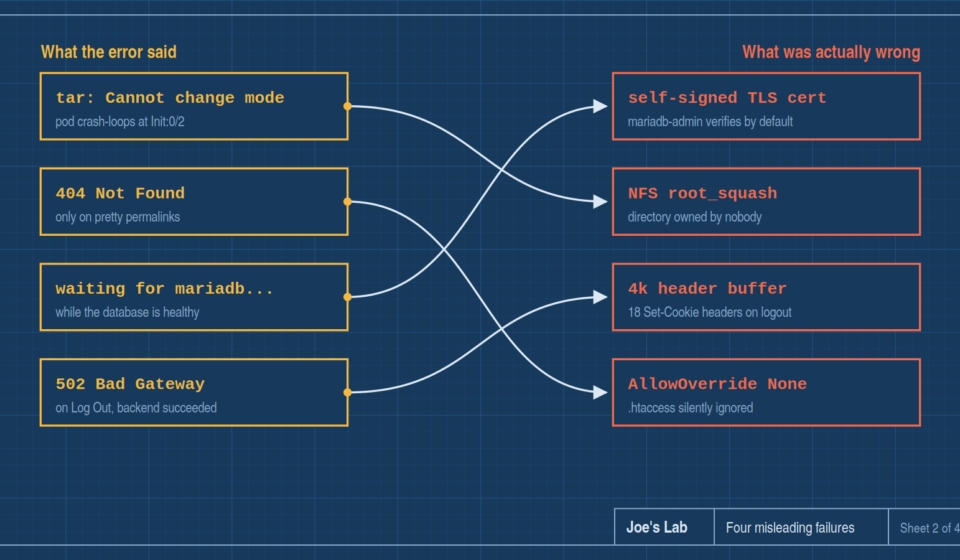
That last part is the interesting bit. None of these were hard problems. All four were misleading ones: the error message named the wrong component, or there was no error message at all. Here’s the whole journey.
The starting point
The target is a homelab RKE2 cluster — Kubernetes 1.35, three control plane nodes, three workers, Cilium with kube-proxy fully replaced in eBPF, ingress-nginx, and cert-manager issuing certificates from an internal CA because there’s no public DNS and no inbound path for ACME.
Storage is the constraint that shapes everything. There’s exactly one backend: an NFS export from another box, over 1 GbE, mounted nfsvers=4.2 with hard. Every persistent volume in the cluster lives there. That single fact is upstream of three of the four failures below.
The plan was ordinary: WordPress, MariaDB, a PVC each, an Ingress, nightly backups.
Decision one: verify before writing
Rather than writing YAML from an upstream example and finding out in the cluster, the images got pulled locally first and poked at — as the actual non-root user, against a directory deliberately owned by nobody with mode 0777, which is what this cluster’s NFS produces under root_squash.
This felt like a detour. It was the single highest-leverage decision in the project, and here’s why.
Failure one: the image cannot install itself
The official WordPress image copies WordPress into your volume on first start. On this cluster, as a non-root user, it cannot:
tar: .: Cannot change mode to rwxrwxrwx: Operation not permitted
tar: Exiting with failure status due to previous errors
The entrypoint copies files in with tar, and for non-root users it adds --no-overwrite-dir to protect the target directory’s metadata. That flag makes tar re-apply the existing directory’s mode after extracting — which is a chmod, and only the owner may chmod. The NFS provisioner creates each PVC directory owned by nobody, so the container’s uid isn’t the owner, the chmod is refused, tar exits 2, and the pod dies before Apache ever starts.
The flag that exists to prevent a permissions error causes one.
Running as root doesn’t help either — root_squash maps root to nobody too. Mounting the volume at wp-content instead of the web root fails identically, because --no-overwrite-dir only protects the tar root.
The fix is unglamorous. An initContainer does the copy itself:
cp -R /usr/src/wordpress/. /var/www/html/Copying into a directory never touches that directory’s own mode. The trailing /. matters. So does using plain cp -R — cp -a fails on preserving times for '/var/www/html/.' for exactly the same reason. Once the files exist, the image’s own entrypoint sees index.php, skips its copy entirely, and behaves normally forever after.
In the cluster, that copy takes 23 seconds for ~2,000 files over NFS.
Had this been discovered in the cluster instead of on a laptop, the symptom would have been Init:0/2 and a CrashLoopBackOff, with a tar error buried in an initContainer’s logs and nothing anywhere mentioning NFS or ownership.
Failure two: permalinks 404 from the wrong server
WordPress ships a .htaccess that rewrites pretty permalinks. Debian’s Apache config sets AllowOverride None for /var/www/, which makes Apache ignore .htaccess completely.
The result: /hello-world/ returns 404 from Apache, while /?p=1 and the entire admin UI work perfectly. That combination reads like a broken theme or a corrupt rewrite rule — anything except a webserver directive.
Confirmed both directions before writing the manifest: AllowOverride None gives 404, AllowOverride All gives 200.
There’s a second half to this one that bit later anyway. WordPress only writes the rewrite rules into .htaccess when you save the Permalinks settings page. A fresh install has the file with empty markers. So even with Apache configured correctly, permalinks 404 until someone clicks Save once. Both halves are now in the README, because either alone produces the identical symptom.
Failure three: a database that was up, and a client that wouldn’t say why
First real deploy. MariaDB: 1/1 Running, healthy, passing its own probes. WordPress: stuck at Init:1/2, printing
waiting for mariadb...
waiting for mariadb...
forever. DNS resolved. The service had endpoints. Nothing in either pod’s events, and nothing in the database’s logs, mentioned a problem.
MariaDB 11.4+ generates a self-signed certificate on first start and enables TLS automatically. mariadb-admin — the tool in the wait loop — verifies certificates by default. So every check failed with:
error: 'TLS/SSL error: self-signed certificate'…which appeared in neither pod’s logs, because the wait loop only printed its own message. Finding it took running the client by hand in a throwaway pod.
The fix is --ssl-verify-server-cert=0, which disables verification but not encryption — connections still negotiate TLS_AES_256_GCM_SHA384.
The genuinely confusing detail: the clients disagree. mariadb-dump and the mariadb client connect fine without the flag; only mariadb-admin refuses. I found this out because the nightly backup job ran successfully at 03:00 while the site itself was still broken — which briefly made no sense at all, and which corrected an assumption I’d written into a comment claiming the backup needed the flag too. It doesn’t. It sets it anyway, so a future image bump can’t make the two drift apart.
Failure four: logging out returned 502
The site had been live for a day when clicking Log Out started returning a 502 and leaving the session logged in.
502 means the backend failed. The backend had not failed.
nginx buffers the upstream’s response headers in a single buffer, 4k by default. Logout is the one WordPress request that overflows it: wp_clear_auth_cookie() expires every authentication cookie at once, and each one is a separate Set-Cookie header. Measured on this site, a bare administrator logout emits 18 Set-Cookie headers totalling 2,705 bytes — already two thirds of the default before a theme or plugin contributes a single cookie. Add the cookies a real session carries and it goes over.
Past the limit, nginx doesn’t truncate the response or warn. It discards it and serves a 502. WordPress logs nothing, because from its side the request succeeded.
The evidence existed in exactly one place — the ingress controller’s log:
upstream sent too big header while reading response header from upstream,
request: "GET /wp-login.php?action=logout&_wpnonce=..."
And only in the log of the replica that happened to serve the request. With six controller pods, grepping one and finding nothing proves nothing.
Reproducing this was harder than fixing it. An anonymous request gets a 403 on the nonce before reaching the code path. A freshly created admin session logged out fine at 302, because it lacked the theme cookies that push a real browser session over the line. So instead of chasing a perfect reproduction, I forced the condition directly — a temporary must-use plugin emitting an 8 KB header block. 502 before the change, 200 after. Then removed the plugin and the throwaway user, and confirmed both were gone.
The fix is one annotation, proxy-buffer-size: 16k, about 6x the measured logout. It’s per-Ingress, not cluster-wide — so every other cookie-heavy app on this cluster is still one theme away from the same bug.
What’s actually running now
WordPress 7.0.2 on PHP 8.4, MariaDB 11.8 LTS, single replica with strategy: Recreate, TLS from the internal CA, nightly verified database dumps, and wp-cron on a real schedule instead of firing off visitor page loads.
Both data volumes use a Retain StorageClass rather than the default. The database holds every post; the web root holds wp-content and wp-config.php, which carries the randomly generated auth salts. Losing those logs every user out permanently. storageClassName is immutable on a PVC, so that had to be right on the first apply — one of the few decisions here with no undo.
A few things were verified rather than assumed, because “it deployed” and “it works” are different claims:
- A full install against MariaDB, end to end.
- A dump/restore round trip: 12 tables and 127
wp_optionsrows, matching exactly. - The probe split — liveness on a static file, readiness on PHP-plus-database. With MariaDB stopped, the static file still returns 200 while
wp-login.phpreturns 500. That’s deliberate: a database blip should pull the pod out of the Service, not restart it and throw away the opcache.
And some things are documented as not covered, which matters more than the list of what is. The nightly dumps contain the database only — the media library isn’t in them. They also sit on the same NFS export as the database they back up, so they cover a bad migration or a fat-fingered delete, but not the storage host failing. That’s the one failure that takes the primary with it.
The actual lesson
Three of these four failures came from the same root: this cluster’s storage squashes root and hands you directories you don’t own. The WordPress image, cp -a, and the wp-content mount layout all break on it in different disguises.
The fourth came from a default sized for a world where responses don’t carry eighteen cookies.
None of them announced themselves. A tar flag meant to avoid a permissions error caused one. A database that was genuinely healthy looked unreachable. A webserver returned 404 for a file that existed. A proxy returned 502 for a backend that succeeded.
The habit that paid for itself repeatedly was refusing to accept a plausible story without reproducing it. The mariadb-dump assumption was wrong and the overnight backup proved it. The logout bug wouldn’t reproduce under a synthetic session, so the condition got forced directly rather than fixed on a guess.
The manifests are heavily commented — not with what the YAML says, but with why it isn’t what you’d expect, and what the failure looks like when it’s wrong. That’s the part worth keeping. In six months the YAML will be obvious and the reasons won’t be.